
Understanding Space-Based Architecture

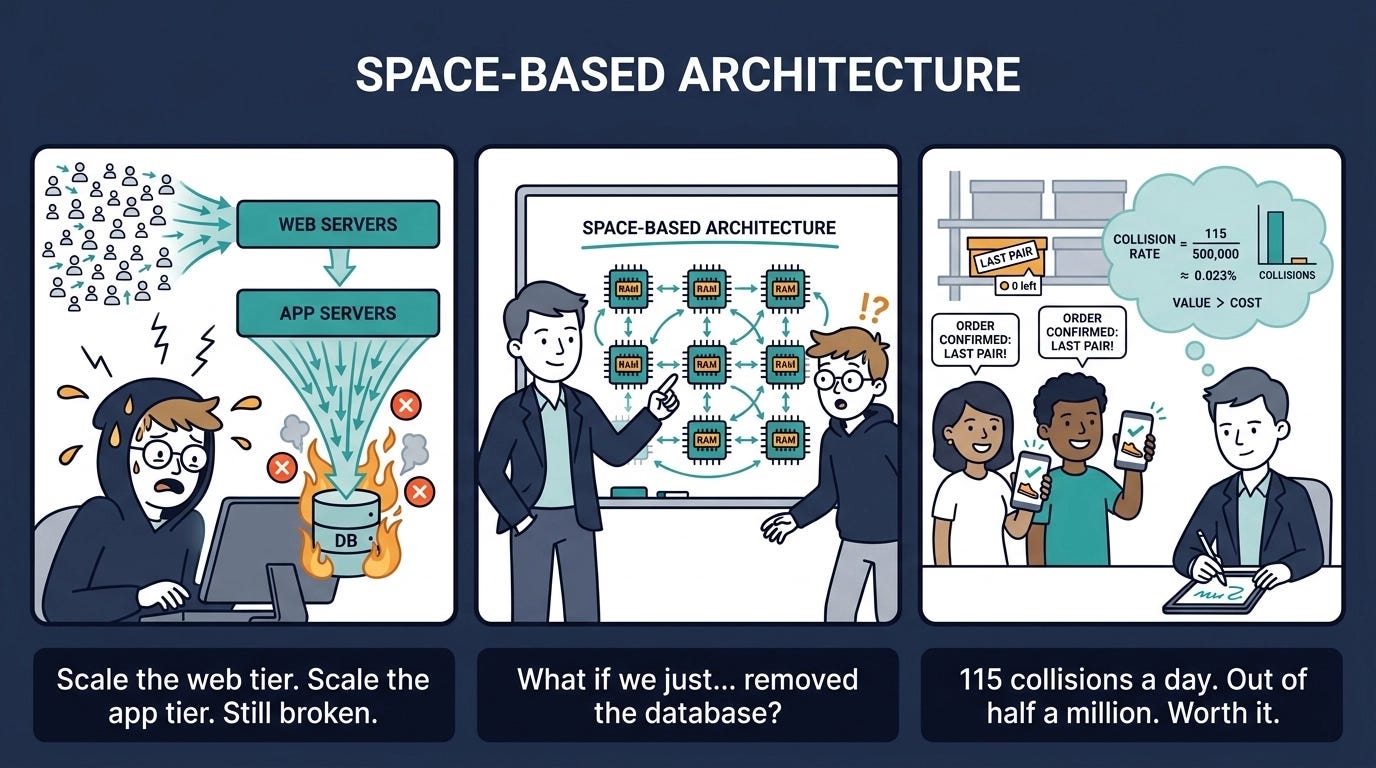
The name is a little misleading. Space-based architecture has nothing to do with outer space and nothing to do with cloud-native as a concept — though the cloud turns out to be a natural fit for it. The name comes from a computer science concept called tuple space: multiple parallel processors sharing a common memory address space. That’s the foundation the whole pattern is built on.
This is one of the most powerful and most misunderstood patterns in the catalog. It solves a specific, brutal problem — and if that problem isn’t yours, you shouldn’t be here. But if it is yours, nothing else comes close.
The Problem: The Database Is Always the Bottleneck
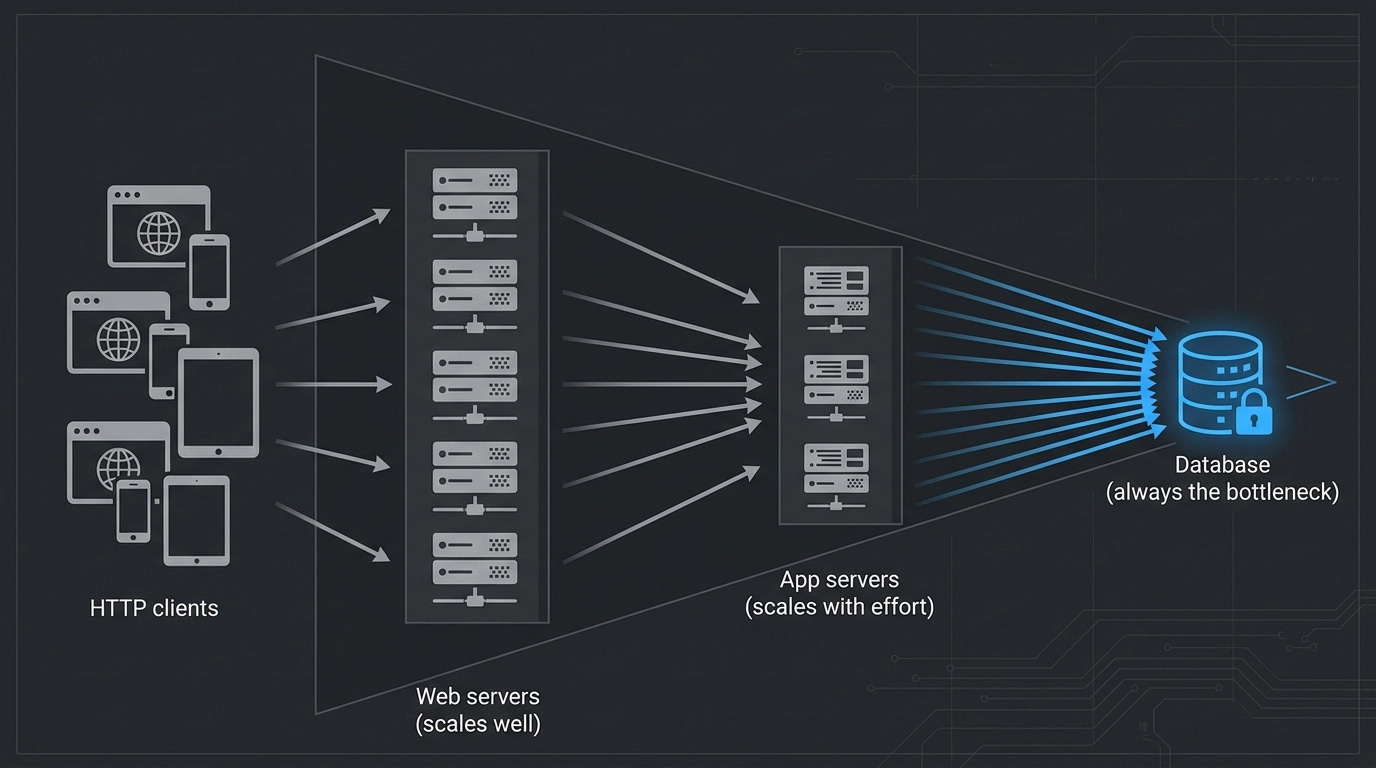
Start with a standard three-tier topology: HTTP clients hitting web servers, web servers talking to app servers, app servers talking to a database. Single instance of each. Obviously, it doesn’t scale. So you scale out the web servers. Easy, cheap, no real complications. Now you can handle thousands of concurrent users.
But the moment those users push through to the app server, you’ve moved the bottleneck, not removed it. So you scale out the app servers too — harder now, because you need to convert local caches to distributed ones, make your IP address references variable, rethink generated IDs that relied on timestamps. More work, more cost. Let’s say you get through it.
Now 5,000 concurrent users are hammering all of it. Still doesn’t work. Because every request that needs to read or write data eventually hits the database, and the database can’t be horizontally scaled the way web servers can. You can shard it, you can throw it into a RAC cluster, but you’re fighting physics. As shown in the diagram below, the overall shape of this topology is a triangle wide on the left and narrowing to a point on the right — no matter how much you scale the web and app tiers, the database remains the apex constraint.
Space-based architecture’s answer to this is radical: remove the database from the request path entirely.
The Core Idea: In-Memory Everything
If you take the traditional three-tier diagram and remove the database, you’re left with something that can scale horizontally almost without limit. Space-based architecture makes that work by replacing the database with a distributed in-memory data grid shared across a set of processing units.
Each processing unit is a self-contained deployment unit. It contains your application code and its own in-memory data grid — a local copy of all the transactional data it needs. When data changes in one processing unit, a replication engine synchronizes that change to all the other processing units. No central database to coordinate through, no locks to wait on, no connection pool to exhaust.
The database doesn’t disappear completely — it just moves off the hot path. Writes flow asynchronously from the in-memory grid out to a persistence layer, usually front-loaded by a cache. This means the database catches up after the fact, not in-line with the request. When a processing unit starts up cold, it loads its initial state from the database. After that, the database only hears about changes — it doesn’t participate in processing them.
The full topology, as shown in the diagram below, arranges multiple processing units behind a virtualized middleware layer. The async database sits off to the side — reachable, but never in the critical path.
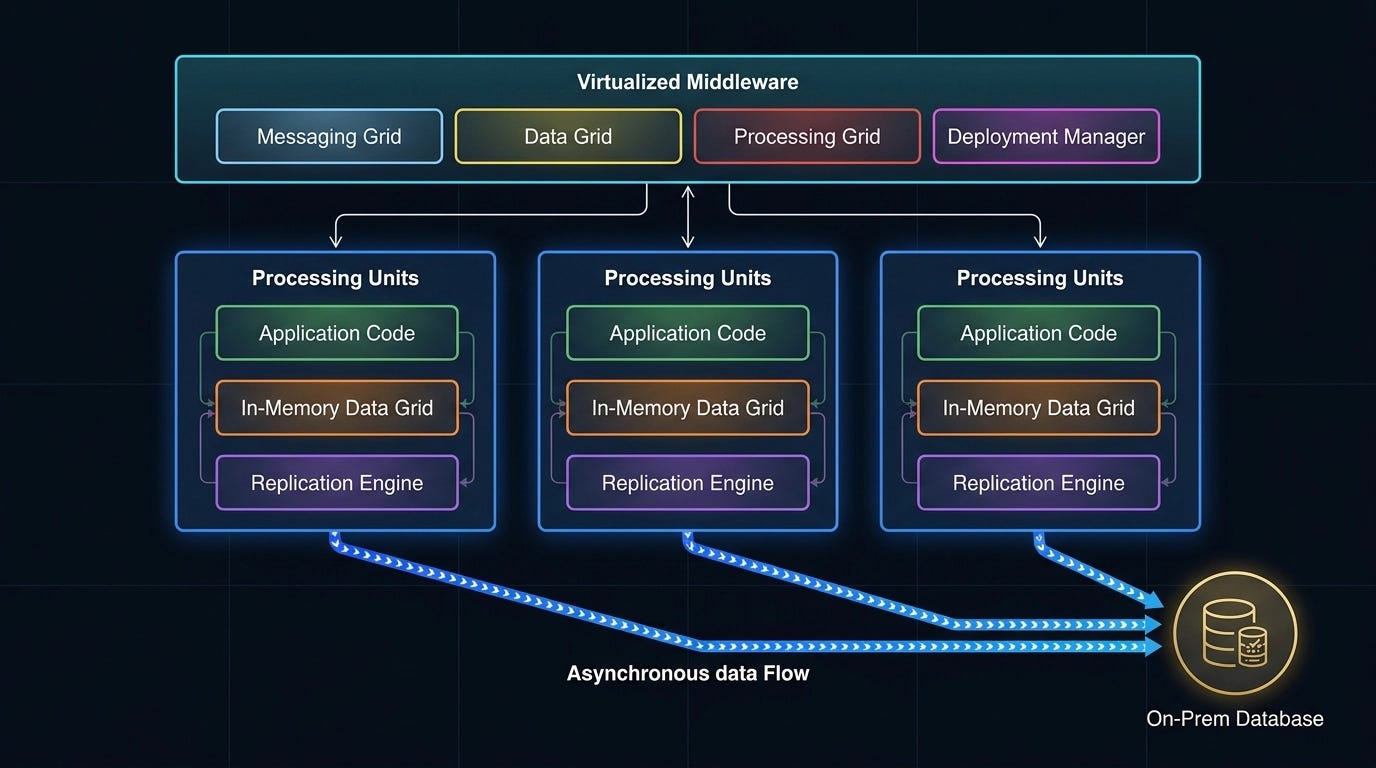
The virtualized middleware layer coordinates everything:
Messaging Grid — handles incoming requests and routes them to whichever processing unit is available. Think of it as a smart proxy. Nginx and Tomcat do this job at the web layer; the messaging grid does it for your processing units.
Data Grid — the most critical component. This is what ensures that when one processing unit updates a piece of data (say, decrementing an inventory count from 12 to 11), all the other processing units reflect that change. The consistency of the entire system depends on this replication being fast and reliable.
Processing Grid — optional. Used when satisfying a request requires coordinating across multiple processing units. Think of it as an integration hub — Apache Camel, Mule, Spring Integration all play this role. It handles the orchestration of “this request needs processing units A, B, and C.”
Deployment Manager — responsible for the dynamic spin-up and teardown of processing units based on load. This is exactly how modern cloud auto-scaling works. Under light load, you run fewer instances. Under heavy load, more spin up automatically. The deployment manager makes that happen.
The Data Collision Problem
Nothing is free. When you replace a central, transactional database with a distributed in-memory cache, you trade ACID consistency for eventual consistency — and eventual consistency has a quantifiable failure mode called a data collision.
A collision happens when two processing units act on the same piece of data before the replication engine has had time to propagate the change. In the shoe inventory example: you have 12 pairs in stock, two users buy the last pair simultaneously across two different processing units, and both transactions succeed — but there’s only one pair. Someone is going to be disappointed.
The collision rate is calculable:
collision_rate = (number_of_grids × update_rate²) / (grid_rows × replication_latency)
Run through a concrete example. Five processing units, 20 updates per second, 50,000 inventory items, replication latency of 100 milliseconds (typical for open-source distributed caching tools). Over an eight-hour business day, that’s 576,000 transactions — and 115 data collisions.
Now drop the replication latency to 1 millisecond — achievable with enterprise-grade tools, at significant cost. As illustrated in the comparison below, the same parameters produce roughly one collision per day. The math is stark: latency has a dramatic, nonlinear impact on collision frequency because update rate is squared in the numerator. The third panel in that diagram also shows what happens when you scale grid count from 5 to 20 at the original 100ms latency — collisions jump from 115 to 461 per day.
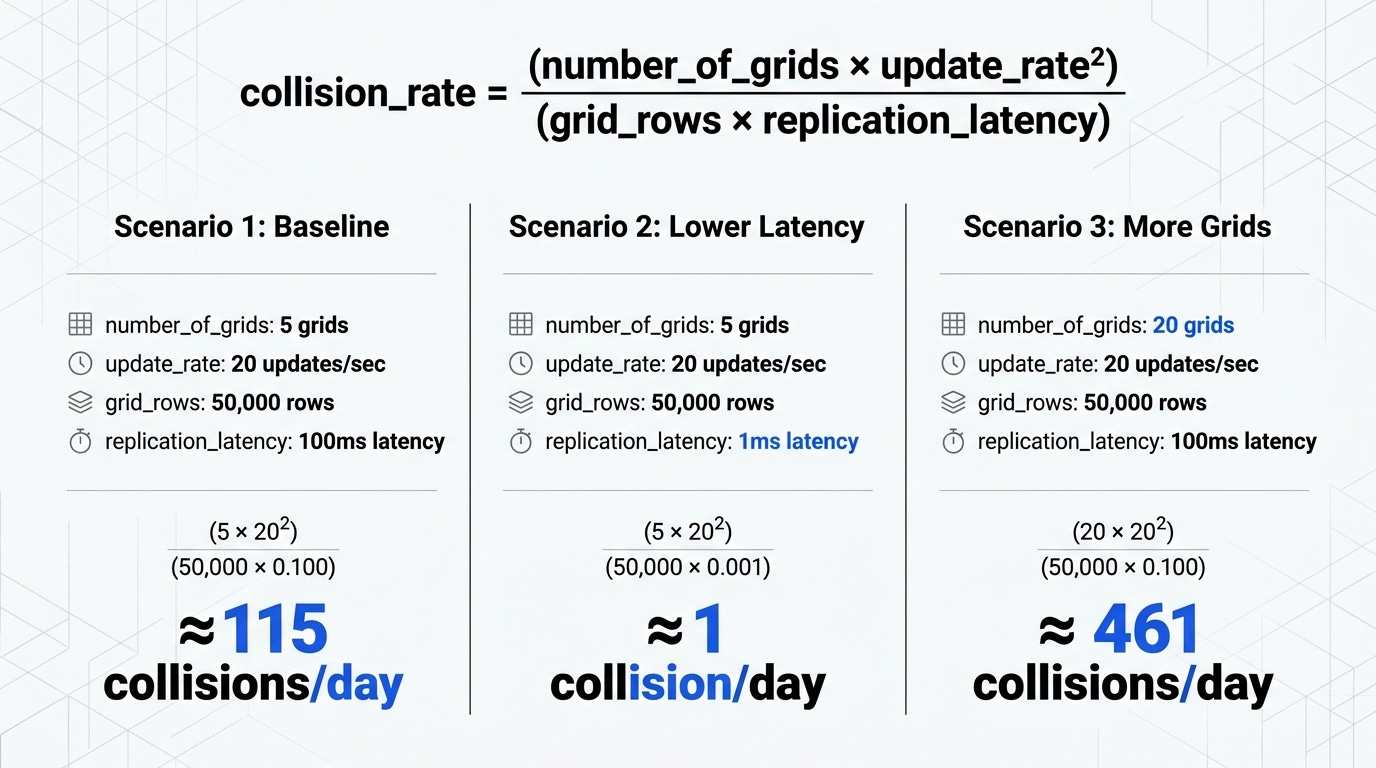
More processing units means more replication paths, and collision rate scales with grid count in the numerator. This is not a reason not to scale — it’s the calculation you bring to the business conversation about how many instances to run in production, and what your acceptable failure tolerance is.
As the architect, you don’t guess. You run the numbers, present them to product owners and executives, put a cost on each collision (a refund, a coupon, a lost sale), and make an informed decision about how much to spend on replication infrastructure.
What It’s Good For (and What It Isn’t)
Space-based architecture is a domain-specific pattern. Its domain is elasticity — systems where the user load is unpredictable, variable, and sometimes extreme. The canonical use case is something like a concert ticketing platform that handles 200 users a minute on a Tuesday afternoon and 400,000 simultaneous requests the moment a popular tour goes on sale. No traditional three-tier system survives that spike with consistent response times. Space-based does, because it scales horizontally with no central bottleneck.
The characteristics profile is strong on the things that matter for these use cases: agility, deployment (hot deploy, spin up, tear down), performance, scalability, and elasticity. These are all strong because the pattern was designed specifically to serve them.
The weaknesses are real and significant.
Testability — How do you test 100,000 simultaneous logins? At 11:00:00.000 exactly? You need 100,000 independent nodes to do it realistically, and that single test run in cloud infrastructure could cost several hundred thousand dollars. The practical answer is uncomfortable: most space-based systems do their high-volume testing in production. Gradual rollouts, feature flags, synthetic load injection — these help, but you’re never fully simulating the real thing in a test environment.
Simplicity — This is an architecturally complex system to design, implement, and reason about. Data replication, collision handling, eventual consistency semantics, dynamic processing unit orchestration — every one of these is a non-trivial engineering problem. Teams new to this pattern underestimate the operational complexity.
Cost — This sits alongside service-oriented architecture as one of the most expensive patterns to build and run. The distributed caching infrastructure is not cheap at scale. The engineering effort is high. The operational overhead is real. You should only be here if the scalability requirement genuinely demands it.
There’s also a hard constraint: this pattern works with object caches and data caches, not with large relational databases. If your system has a two-terabyte Oracle RAC cluster as its system of record, you can’t simply lift that data into in-memory grids. The pattern requires that your working dataset fit in distributed memory across your processing units. For transactional microservices-style workloads with bounded data domains, this is fine. For large-scale enterprise data stores, it’s often not.
When You Should Use It
One clean signal: your architecture characteristic analysis has produced elasticity as the dominant requirement. Not just scalability (planning to 2x user growth year over year) — elasticity (unpredictable, spiky load that must be handled without degradation). If that’s the requirement, space-based architecture is purpose-built for it.
It pairs well with microservices. When the processing units represent small, single-purpose services, the granularity is right — each unit’s in-memory data grid is small and fast to replicate, and the deployment manager can spin them up and down at fine-grained boundaries. The hybrid of microservices within a space-based infrastructure gets you both the domain isolation of microservices and the elastic scalability of the space-based pattern.
It’s the wrong choice when you have a stable, predictable load; when your domain data is large and relational; or when the cost and complexity of the infrastructure isn’t justified by the scalability need. Know the signal before you commit. This is one of the most expensive architectural decisions you can make, and “it seemed cool” is not a valid architectural characteristic.
Part of a series based on the O’Reilly Software Architecture Fundamentals course by Mark Richards and Neil Ford. Not sponsored or affiliated — just a resource I genuinely find useful. If you want to go deeper, O’Reilly Learning offers a 10-day free trial with access to courses, books, and hands-on labs.